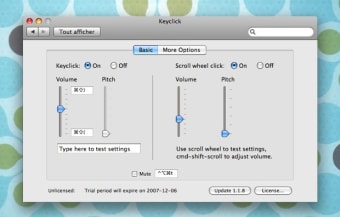
Keyclick is ideal to become an expert at touch typing, where you don't need to look at your keyboard to type. Keyclick will be installed into your Preferences pane and is easily adjustable. We recommend putting the volume at the lowest possible, so you don't get tired of it. The application will provide sound not only for your keystrokes but also for mouse clicks and scrolling. You'll be able to exclude applications, like games, from making sounds when typing.
If you enjoy using keyboard combinations, you'll be glad to know that Keyclick lets you use hotkeys to control the volume of your keystrokes. You can even mute it completely by simply pressing Control-Alt-Command-T. In all, Keyclick should help you improve your typing considerably.
Keyclick is a useful Mac preference pane which provides sounds for your keystrokes, helping you learn how to type better.
Keyclick is a Mac OS X preference pane that provides adjustable audio feedback for keystrokes, mouse clicks, and the scroll wheel. Years ago keyboards were made with premium key switches that provided a resounding click when a key snapped over. Today most keyboards are made using rubber domes which can provide a similar force displacement or tactile feel, but not the sound. Human factors work on video terminals in the 1980s showed that the perception of keyboard crispness is correlated with audio feedback. Keyclick provides that feedback while improving on the original.
While there are existing programs that imitate the sound of an old fashioned typewriter, they do not appear to be intended as a practical touch typing aid. To be most effective, the feedback needs to be subtle and non-distracting. Keyclick allows you to adjust the volume up or down at any time without even visiting the Keyclick Preferences Panel. Use Cmd-Shift-) for louder, and Cmd-Shift-( for softer (or define your own shortcuts). The volume is also affected by the system volume setting so it can adapt more easily to quiet or noisy surroundings. I suggest starting just above the softest volume that's clearly discernible.
Many long time computer users have fond memories of a favorite keyboard. Perhaps it was the Apple Extended keyboard (saratoga) or IBM Model M. Replacement keyboards with premium mechanical key switches are still available and popular with some programmers (like the Matias TactilePro), but at $50 and up these keyboards may be more than desired. Keyclick is only US $5 for up to 5 keyboards you own or control, and works on laptops. If your keyboard seems mushy, or you've ever longed for the crisp feel of an older keyboard, give it a try. You might be surprised how much you like the keyboard you already own.
Laws concerning the use of this software vary from country to country. We do not encourage or condone the use of this program if it is in violation of these laws. Softonic may receive a referral fee if you click or buy any of the products featured here.